ASP.Net Update Panel – Javascript Event – jQuery Click


Warning: WP_Syntax::substituteToken(): Argument #1 ($match) must be passed by reference, value given in /home/www/danfolkes.com/wp-content/plugins/wp-syntax/wp-syntax.php on line 383

Warning: WP_Syntax::substituteToken(): Argument #1 ($match) must be passed by reference, value given in /home/www/danfolkes.com/wp-content/plugins/wp-syntax/wp-syntax.php on line 383

Warning: WP_Syntax::substituteToken(): Argument #1 ($match) must be passed by reference, value given in /home/www/danfolkes.com/wp-content/plugins/wp-syntax/wp-syntax.php on line 383

Warning: WP_Syntax::substituteToken(): Argument #1 ($match) must be passed by reference, value given in /home/www/danfolkes.com/wp-content/plugins/wp-syntax/wp-syntax.php on line 383

I needed to add a onclick event to a textbox in asp.net to change it to remove text from a textbox onClick when it is clicked.
The normal code would look something like this:

1
<asp:TextBox  ID="txtStoreLocatorZip" ValidationGroup="CustomerServiceEmail" runat="server" Text="Enter Zip" CssClass="txtStoreLocatorZip_CssClass" />
1
2
3
4
5
6
7
8
9
<script>
        if ($('.txtStoreLocatorZip_CssClass').val() == 'Enter Zip') {
            $('.txtStoreLocatorZip_CssClass').click(function () {
                if ($('.txtStoreLocatorZip_CssClass').val() == 'Enter Zip') {
                    $('.txtStoreLocatorZip_CssClass').val('');
                }
            });
        }
</script>

But, this won’t quite work because my textbox is in a UpdatePanel’s ContentTemplate and the javascript is not read on postback.

So, This is what I ended up doing (a simplified version):

1
2
3
4
5
<asp:UpdatePanel ID="UpdatePanel2" runat="server" UpdateMode="Conditional">
	<ContentTemplate>
		<asp:TextBox  ID="txtStoreLocatorZip" ValidationGroup="CustomerServiceEmail" runat="server" Text="Enter Zip" CssClass="txtStoreLocatorZip_CssClass" />
	</ContentTemplate>
</asp:UpdatePanel>
1
2
3
4
5
6
7
8
9
10
11
12
<script>
	Sys.WebForms.PageRequestManager.getInstance().add_endRequest(endRequestHandler);
	function endRequestHandler(sender, args) {
		if ($('.txtStoreLocatorZip_CssClass').val() == 'Enter Zip') {
			$('.txtStoreLocatorZip_CssClass').click(function () {
				if ($('.txtStoreLocatorZip_CssClass').val() == 'Enter Zip') {
					$('.txtStoreLocatorZip_CssClass').val('');
				}
			});
		}
	}
</script>

This will add an endRequest handler to the end of the partial page postback so that you can call a nice little function at the end of it.

Hope this helps some people!
Asp.Net – Adding Parameters to CommandType.Text


Warning: WP_Syntax::substituteToken(): Argument #1 ($match) must be passed by reference, value given in /home/www/danfolkes.com/wp-content/plugins/wp-syntax/wp-syntax.php on line 383

This is how you add parameters to a standard CommandType.Text SQL call.

This should prevent sql injection attacks.

        Using conSQL = New SqlConnection("CONNECTION STRING TO DATABASE")
            Try
                str = "SELECT * FROM TableName where customerid = @CustomerID and CartType = @CartType"
                cmdSQL = New SqlCommand(str, conSQL)
                cmdSQL.CommandType = CommandType.Text
                cmdSQL.Parameters.AddWithValue("@CustomerID", CustomerID)
                cmdSQL.Parameters.AddWithValue("@CartType", cartType)
                cartcount = cmdSQL.ExecuteScalar()
            Catch ex As Exception
                cartcount = 0
            End Try
        End Using

Asp DropDownList – States – ListItem Example


Warning: WP_Syntax::substituteToken(): Argument #1 ($match) must be passed by reference, value given in /home/www/danfolkes.com/wp-content/plugins/wp-syntax/wp-syntax.php on line 383

Asp DropDownList - States - ListItem Example
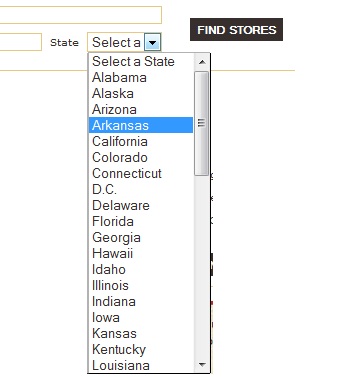
Compiled List of US State Drop Downs for Asp.Net Forms:

Hope this helps!

<asp:DropDownList ID="ddlState" runat="server">
    <asp:ListItem Value="" Selected="True">Select a State</asp:ListItem>
    <asp:ListItem value="AL">Alabama</asp:ListItem>
    <asp:ListItem value="AK">Alaska</asp:ListItem>
    <asp:ListItem value="AZ">Arizona</asp:ListItem>
    <asp:ListItem value="AR">Arkansas</asp:ListItem>
    <asp:ListItem value="CA">California</asp:ListItem>
    <asp:ListItem value="CO">Colorado</asp:ListItem>
    <asp:ListItem value="CT">Connecticut</asp:ListItem>
    <asp:ListItem value="DC">D.C.</asp:ListItem>
    <asp:ListItem value="DE">Delaware</asp:ListItem>
    <asp:ListItem value="FL">Florida</asp:ListItem>
    <asp:ListItem value="GA">Georgia</asp:ListItem>
    <asp:ListItem value="HI">Hawaii</asp:ListItem>
    <asp:ListItem value="ID">Idaho</asp:ListItem>
    <asp:ListItem value="IL">Illinois</asp:ListItem>
    <asp:ListItem value="IN">Indiana</asp:ListItem>
    <asp:ListItem value="IA">Iowa</asp:ListItem>
    <asp:ListItem value="KS">Kansas</asp:ListItem>
    <asp:ListItem value="KY">Kentucky</asp:ListItem>
    <asp:ListItem value="LA">Louisiana</asp:ListItem>
    <asp:ListItem value="ME">Maine</asp:ListItem>
    <asp:ListItem value="MD">Maryland</asp:ListItem>
    <asp:ListItem value="MA">Massachusetts</asp:ListItem>
    <asp:ListItem value="MI">Michigan</asp:ListItem>
    <asp:ListItem value="MN">Minnesota</asp:ListItem>
    <asp:ListItem value="MS">Mississippi</asp:ListItem>
    <asp:ListItem value="MO">Missouri</asp:ListItem>
    <asp:ListItem value="MT">Montana</asp:ListItem>
    <asp:ListItem value="NE">Nebraska</asp:ListItem>
    <asp:ListItem value="NV">Nevada</asp:ListItem>
    <asp:ListItem value="NH">New Hampshire</asp:ListItem>
    <asp:ListItem value="NJ">New Jersey</asp:ListItem>
    <asp:ListItem value="NM">New Mexico</asp:ListItem>
    <asp:ListItem value="NY">New York</asp:ListItem>
    <asp:ListItem value="NC">North Carolina</asp:ListItem>
    <asp:ListItem value="ND">North Dakota</asp:ListItem>
    <asp:ListItem value="OH">Ohio</asp:ListItem>
    <asp:ListItem value="OK">Oklahoma</asp:ListItem>
    <asp:ListItem value="OR">Oregon</asp:ListItem>
    <asp:ListItem value="PA">Pennsylvania</asp:ListItem>
    <asp:ListItem value="RI">Rhode Island</asp:ListItem>
    <asp:ListItem value="SC">South Carolina</asp:ListItem>
    <asp:ListItem value="SD">South Dakota</asp:ListItem>
    <asp:ListItem value="TN">Tennessee</asp:ListItem>
    <asp:ListItem value="TX">Texas</asp:ListItem>
    <asp:ListItem value="UT">Utah</asp:ListItem>
    <asp:ListItem value="VT">Vermont</asp:ListItem>
    <asp:ListItem value="VA">Virginia</asp:ListItem>
    <asp:ListItem value="WA">Washington</asp:ListItem>
    <asp:ListItem value="WV">West Virginia</asp:ListItem>
    <asp:ListItem value="WI">Wisconsin</asp:ListItem>
    <asp:ListItem value="WY">Wyoming</asp:ListItem>
</asp:DropDownList>

More State Drop Downs After the fold:
Continue reading “Asp DropDownList – States – ListItem Example”

Asp.Net VB – Listview – ItemCommand – DataKeys – CommandName – SQL


Warning: WP_Syntax::substituteToken(): Argument #1 ($match) must be passed by reference, value given in /home/www/danfolkes.com/wp-content/plugins/wp-syntax/wp-syntax.php on line 383

Warning: WP_Syntax::substituteToken(): Argument #1 ($match) must be passed by reference, value given in /home/www/danfolkes.com/wp-content/plugins/wp-syntax/wp-syntax.php on line 383

Asp.Net VB - Listview - ItemCommand - DataKeys - CommandName - SQL

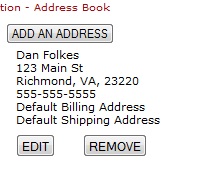
Here is a basic Listview that has an ItemCommand and ItemDataBound:

Frontend Code:

<asp:ListView ID="lvAddresses" runat="server" DataKeyNames="AddressID,BillingAddressID,ShippingAddressID">
        <LayoutTemplate>
            <asp:PlaceHolder ID="itemPlaceholder" runat="server"></asp:PlaceHolder>
        </LayoutTemplate>
        <ItemTemplate>
            <table class="noborder address_book" cellpadding="0" cellspacing="0"><tbody>
                <tr>
                    <td colspan="2">
                        <%#DataBinder.Eval(Container.DataItem, "FirstName")%> <%#DataBinder.Eval(Container.DataItem, "LastName")%><br>
                        <%#DataBinder.Eval(Container.DataItem, "Address1")%><br>
                        <%#DataBinder.Eval(Container.DataItem, "City")%>, <%#DataBinder.Eval(Container.DataItem, "State")%>, <%#DataBinder.Eval(Container.DataItem, "Zip")%><br>
                        <%#DataBinder.Eval(Container.DataItem, "Phone")%><br>
                        <span class="caption"><asp:LinkButton ID="lnkMakeDefault_Billing" CommandName="MakeDefault_Billing" runat="server">Click to make Default Billing Address</asp:LinkButton></span>
                        <span class="caption"><asp:Literal ID="litMakeDefault_Billing" runat="server" Text="Default Billing Address"></asp:Literal></span>
                        <br />
                        <span class="caption"><asp:LinkButton ID="lnkMakeDefault_Shipping" CommandName="MakeDefault_Shipping" runat="server">Click to make Default Shipping Address</asp:LinkButton></span>
                        <span class="caption"><asp:Literal ID="litMakeDefault_Shipping" runat="server" Text="Default Shipping Address"></asp:Literal></span>
                    </td>
                </tr>
                <tr>
                    <td>
                        <asp:Button ID="Button1" runat="server" Text="EDIT" CommandName="EDITAddress"/>
                    </td>
                    <td>
                        <asp:Button ID="btnREMOVE" runat="server" Text="REMOVE" CommandName="REMOVEAddress"/>
                    </td>
                </tr>
            </tbody></table>
 
        </ItemTemplate>
    </asp:ListView>

Backend Code:

Protected Sub Page_PreRender(ByVal sender As Object, ByVal e As System.EventArgs) Handles Me.PreRender
 
        FindIt()
 
    End Sub
    Private Sub FindIt()
 
        lblAddresses.Text = ""
 
        Dim sqlDataConnection As System.Data.SqlClient.SqlConnection = CDataAccess.OpenDatabase
        Dim conStr As String = sqlDataConnection.ConnectionString
        sqlDataConnection.Close()
 
        Dim selectCommand As String = "SELECT Address.*, Customer.BillingAddressID, Customer.ShippingAddressID"
        selectCommand &= " FROM Address INNER JOIN Customer ON Address.CustomerID = Customer.CustomerID"
        selectCommand &= " WHERE Address.CustomerID = @CustomerID AND Address.Deleted = 0"
 
        Dim sds As New SqlDataSource()
        sds.ConnectionString = conStr
        sds.SelectParameters.Clear()
 
        sds.SelectParameters.Add("CustomerID", 12345)
        sds.SelectCommand = selectCommand
 
        lvAddresses.DataSource = sds
        lvAddresses.DataBind()
    End Sub
 
    Protected Sub lvAddresses_ItemCommand(ByVal sender As Object, ByVal e As System.Web.UI.WebControls.ListViewCommandEventArgs) Handles lvAddresses.ItemCommand
        Dim dataItem As ListViewDataItem = e.Item
        Dim currentDataKey As DataKey = lvAddresses.DataKeys(dataItem.DataItemIndex)
        Dim AddressID As Integer = currentDataKey("AddressID")
        Dim BillingAddressID As Integer = currentDataKey("BillingAddressID")
        Dim ShippingAddressID As Integer = currentDataKey("ShippingAddressID")
 
        'MakeDefault_Billing
        'MakeDefault_Shipping
        'EDITAddress
        'REMOVEAddress
        If String.Equals(e.CommandName, "MakeDefault_Billing") Then
            MakeDefault(AddressID, True)
        ElseIf String.Equals(e.CommandName, "MakeDefault_Shipping") Then
            MakeDefault(AddressID, False)
        ElseIf String.Equals(e.CommandName, "EDITAddress") Then
            EditAddress(AddressID)
        ElseIf String.Equals(e.CommandName, "REMOVEAddress") Then
            RemoveAddress(AddressID)
        End If
    End Sub
 
    Protected Sub lvAddresses_ItemDataBound(ByVal sender As Object, ByVal e As System.Web.UI.WebControls.ListViewItemEventArgs) Handles lvAddresses.ItemDataBound
        Dim dataItem As ListViewDataItem = e.Item
 
        If e.Item.ItemType = ListViewItemType.DataItem Then
            Dim currentDataKey As DataKey = lvAddresses.DataKeys(dataItem.DataItemIndex)
            Dim AddressID As Integer = currentDataKey("AddressID")
            Dim BillingAddressID As Integer = currentDataKey("BillingAddressID")
            Dim ShippingAddressID As Integer = currentDataKey("ShippingAddressID")
            lit = e.Item.FindControl("litMakeDefault_Billing")
            Dim lit2 As Literal = e.Item.FindControl("litMakeDefault_Shipping")
            lnk = e.Item.FindControl("lnkMakeDefault_Billing")
            Dim lnk2 As LinkButton = e.Item.FindControl("lnkMakeDefault_Shipping")
 
            lit.Visible = Not lnk.Visible
        End If
 
    End Sub

ASPDotNetStoreFront: Adding Topic to XML Packages or .aspx Pages


Warning: WP_Syntax::substituteToken(): Argument #1 ($match) must be passed by reference, value given in /home/www/danfolkes.com/wp-content/plugins/wp-syntax/wp-syntax.php on line 383

Warning: WP_Syntax::substituteToken(): Argument #1 ($match) must be passed by reference, value given in /home/www/danfolkes.com/wp-content/plugins/wp-syntax/wp-syntax.php on line 383

This is how you add a DotNetStoreFront’s Topic into a XMLPackage:

<xsl:value-of select="aspdnsf:Topic('TOPIC_NAME')" disable-output-escaping="yes"/>

Now, if you want to add it to a .aspx or .ascx page on dnsf:

<aspdnsf:Topic runat="server" ID="Topic1" TopicName="TOPIC_NAME" />

.Net – Sending Email with In Memory Attachment


Warning: WP_Syntax::substituteToken(): Argument #1 ($match) must be passed by reference, value given in /home/www/danfolkes.com/wp-content/plugins/wp-syntax/wp-syntax.php on line 383

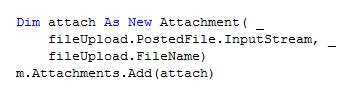
This VB.Net code takes the FileUpload control’s PostedFile and without saving it to the filesystem attaches it to an MailMessage and sends an email.

Advantages:

  • No threading, read/write permissions needed.
  • One line of code.

Front End:

<asp:FileUpload ID="fileUpload" runat="server" />

Code:

Dim m As New MailMessage()
m.Attachments.Add(New Attachment(fileUpload.PostedFile.InputStream, fileUpload.FileName))