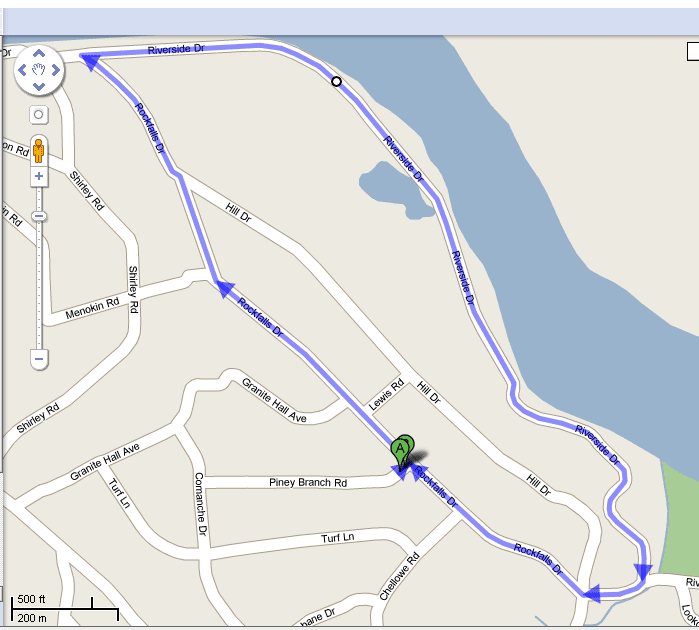
At 9:45pm, this is a horrifying 2.1 mile run
programmers blog
It’s going to be a lot like:
http://www.evrium.com/store/fg2p_details.php
But much cheaper.

This was recorded by me at a bar behind the Norva in Norfolk, VA around 2006. The recording is a tad crappy because I used my little mp3 player to record it.
But, I captured Mat Kearney playing “In the Middle” for the first time, acoustic, just using his guitar. It was very awesome.
Here is a little bit of the chit-chat that happened before he started playing:
“But, I can’t play it on guitar” – He was a little reluctant to play it at first, but then he proceeded by starting to try….
After he got a little bit into the song he said: “Wow” because he was genuinely surprised when it sounded good.
Then, after he was finished he said:
“I promise you, that has never happened!… That was amazing… ”
“I honestly never played that on a guitar once, ever…. I’m not lying.”
So, I feel pretty good that Mat Kearney is awesome, and so is this song.
Download Bootleg – 06-in-the-middle
Here are the lyrics:
Continue reading “Mat Kearney – In the Middle – First Time Ever – Download Bootleg – Lyrics”


Monday – Friday:
5 am-9 – Morning Edition – 88.9
8 am-9 – Democracy Now! – 97.3
9am-11pm – Various Talk Shows, Some local, some syndicated – 97.3
11 am-12 – Tell Me More – 97.3
2pm-4 – Talk of the Nation – 97.3
3pm-4 – Fresh Air with Terry Gross – 88.9
4pm-6 – All Things Considered – 88.9
6pm-7 – Marketplace – 88.9
UPDATE: There has and will continue to be programming changes on these stations…. but lately I do this:
5am – 9am – Daily US and World News – 88.9
9am – 5pm – Insightful Syndicated & Local Talk Shows – 97.3
5pm – 6pm – Daily/World News – 88.9
6pm – 7pm – Marketplace (Money News) – 88.9
7pm – 5am – Jazz (88.9), Indie Music (97.3)
97.3 – WRIR – (Schedule) (Listen Online) – Richmond Independent Radio
88.9 – WCVE – (Site) (Listen Online) – ideastations

I have used Google Reader to mash two image rss feeds together for Hubble.
Here is the HTML page for it:
https://www.google.com/reader/shared/user%2F15478232717259537591%2Flabel%2FHubble
Here is the RSS Feed:
http://www.google.com/reader/public/atom/user%2F15478232717259537591%2Flabel%2FHubble
Based off of:
http://hubblesite.org/newscenter/newscenter_rss.php
and
http://www.spacetelescope.org/rss/feed.xml
Enjoy space nerds.
This is similar to my Python script here:
http://danfolkes.com/index.php/2009/04/29/ipmapcom-python/
It uses this sites service to pull the location of each user:
http://www.ipmap.com/
It outputs in XML, Plain Text, and HTML.
Fields:
HERE IS THE LINK TO THE WEB SERVICE SITE:
http://www.danfolkes.com/ipmaps/
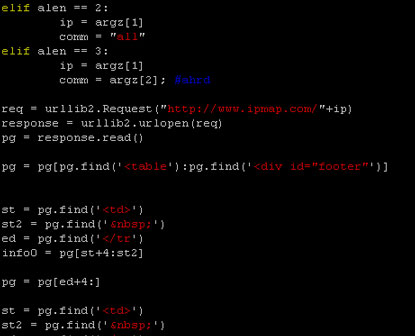
This program uses this site IpMap to get peoples location based off of their IP address.
It’s written in python. Enjoy.
Download Source – GPLv3 Code. Give back.
Usage:
python ipmap.py 74.125.45.100 all
python ipmap.py 74.125.45.100
python ipmap.py (This will get you the help screen)
Args:
all = Prints all details
nomap = Gets All, no map
loc = Gets: Country, Region, City
Continue reading “IPMap Python Ip Address Locator Command Line Script”

I am creating a web service for musicians that will allow them to reference an abundance of musical references on the fly using AJAX.
Firstly, it will deliver chords and fingerings of chords for guitars to the users websites (think Google Maps).
My goal is to enhance the web.
Here is the site: http://cws.danfolkes.com
It’s still in development, but it’s getting close to launch.
Let me know what you think (only if it’s nice) 😀
This is a rewrite of my original post. This rewrite was made by Rami Davis [ramidavis at y a h o o .c o m] XDA Dev Forums.
It would go perfect with this:
http://www.flickr.com/photos/svofski/3383950702/in/pool-make
1 2 3 4 5 6 7 8 9 10 11 12 13 14 15 16 17 18 19 20 21 22 23 24 25 26 27 28 29 30 31 32 33 34 35 36 37 38 39 40 41 42 43 44 45 46 47 48 49 50 51 52 53 54 55 56 57 58 59 60 61 | #!/usr/bin/python3 #using python3 import time #Cellphone keyboard imitation cell_keyboard = { "0" : (" "), "1" : ("!","@","#","$","%","^","&","*","(",")"), "2" : ("a","b","c","A","B","C"), "3" : ("d","e","f","D","E","F"), "4" : ("g","h","i","G","H","I"), "5" : ("j","k","l","J","K","K"), "6" : ("m","n","o","M","N","O"), "7" : ("p","q","r","s","P","Q","R","S"), "8" : ("t","u","v","T","U","V"), "9" : ("w","x","y","z","W","X","Y","Z"), "#" : (" "), #add something here "*" : (" ") } THRESHOLD = 1.0 # Constant: Seconds before resetting the keyboard user_input = "" # Current user input last_key = ["", 0] # Last key and repetitions. print("Valid characters: 0-9 # * and q to quit") while not user_input == "q": try: #Measure the time it takes to respond. response_time = time.time() user_input = input(">>")[0] response_time = time.time() - response_time except IndexError: user_input = "" #Check if it's valid if user_input in cell_keyboard: #If it matches the last key if user_input == last_key[0]: # And it was within threshold if response_time < THRESHOLD: last_key[1] += 1 else: last_key[1] = 0 else: # Assign the new key and 0 repetitions last_key[0] = user_input last_key[1] = 0 #Now request the element on the keyboard. try: print(cell_keyboard[last_key[0]][last_key[1]]) except IndexError: last_key[1] = 0 print(cell_keyboard[last_key[0]][last_key[1]]) else: print("Not a valid key.") |
Thanks Rami!
HOWTO: Setup an Aggregated RSS feed for your Friends using Google Reader
Lets say you have three friends, and you don’t really want to check all of there twitter, blogs, rss feeds all day long.
RSS Feeds:
http://danfolkes.com/index.php/feed/
http://twitter.com/statuses/user_timeline/17508497.rss
http://rss.slashdot.org/Slashdot/slashdot
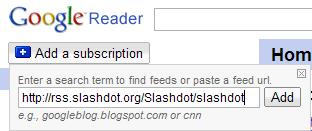
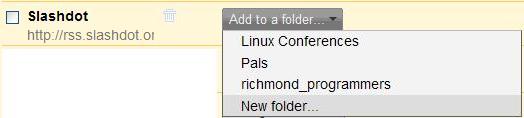

I hope this helps someone! Leave comments if it did.